













Bachs lets your WooCommerce store accept payments from customers across Africa; cards, bank transfers, mobile money, and crypto stablecoins. Customers can pay through a single secure checkout, and settles your funds in USD or NGN. This guide walks you through installing and configuring the Payment Gateway for Bachs for WooCommerce plugin so your store can start taking payments.
Before you start, make sure you have an active WooCommerce store with its currency set to USD or NGN, an SSL certificate (required for live payments), and a free Bachs account.
Installation
Automatic Installation
- Log in to your WordPress Admin Dashboard.
- Navigate to Plugins > Add New.
- Search for “Payment Gateway for Bachs for WooCommerce”.
- Click Install Now and then Activate.
Manual Installation
- Download the plugin .zip from the WordPress.org plugin repository.
- Upload the
payment-gateway-for-bachs-for-woocommercefolder to/wp-content/plugins/via FTP or your hosting control panel. - Go to Plugins > Installed Plugins and click Activate under Payment Gateway for Bachs for WooCommerce.
- Navigate to WooCommerce > Settings > Payments to configure.
Configuring Bachs in WooCommerce
Enable Bachs
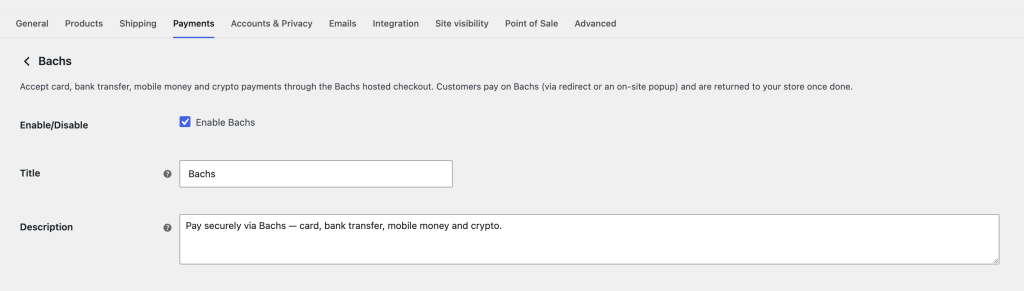
Go to WooCommerce > Settings > Payments and click Manage next to Bachs to open its settings page. Check Enable Bachs to activate the gateway.
Customize Payment Display
- Title – what customers see at checkout. Example: Bachs.
- Description – a short line under the title. Example: Pay securely via Bachs — card, bank transfer, mobile money and crypto.
Choose Your Checkout Type
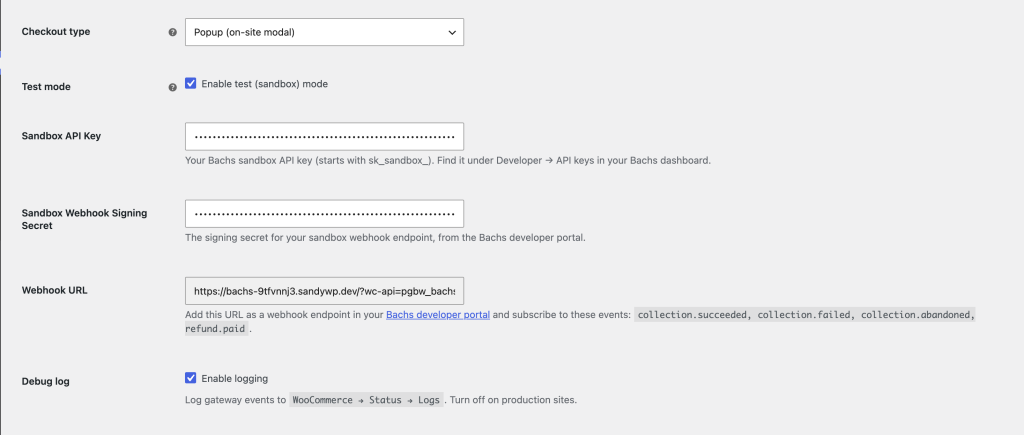
- Redirect – sends the customer to the Bachs hosted checkout page, then back to your store.
- Popup – opens the Bachs checkout in a modal on your store, so the customer never leaves your site.
Both use the same secure Bachs checkout and are confirmed by the same webhook.
Select Test or Live Mode
- Enable Test mode to run sandbox transactions before going live.
- Uncheck it to start accepting real payments.
Add Your API Keys
Get your credentials from your Bachs Dashboard > Developer > API keys:
- Sandbox API Key – your
sk_sandbox_…key (used while Test mode is on). - Sandbox Webhook Signing Secret – validates sandbox webhooks.
- Live API Key – your
sk_live_…key (used in live mode). - Live Webhook Signing Secret – validates live webhooks.
The sandbox fields show while Test mode is on; the live fields show when it’s off.
Set Up the Webhook
Bachs confirms every payment with a signed webhook, so this step is required.
- Copy the Webhook URL on the settings screen.
- In your Bachs developer portal, add it as a webhook endpoint.
- Subscribe to:
collection.succeeded,collection.failed,collection.abandoned,refund.paid. - Paste the endpoint’s signing secret into the plugin’s Webhook Signing Secret field (matching your mode).
Turn On Debug Logging (Optional)
Enable Debug log only when troubleshooting — events land under WooCommerce > Status > Logs. Leave it off in production.
Save Your Settings
Click Save changes. 📌 Important: the Webhook URL must be added in your Bachs developer portal (with the events + signing secret) or Bachs can’t notify WooCommerce about successful payments.
You’re All Set!
- Customers can pay with cards, bank transfer, mobile money, or crypto through Bachs.
- With Adaptive Pricing enabled, shoppers across Africa can pay in their local currency (GHS, KES, UGX, TZS, XAF, XOF, ZMW, RWF and more).
- WooCommerce confirms and completes each order automatically when the payment webhook arrives.
- Refund straight from the WooCommerce order screen (Bachs allows one refund per charge).
- Settlement is made to your Bachs balance in USD or NGN.